



MSI 24" PRO MP2412 Flat FHD Monitor, VA Panel 100Hz, Adaptive Sync - HDMI, DP (Black)
PRO MP2412
Condition: NEW
- Regular price
-
Dhs. 244.00 (exc. Vat) - Regular price
-
(exc. Vat) - Sale price
-
Dhs. 244.00 (exc. Vat)
-
Hurry, only 3 items left in stock!
Couldn't load pickup availability
Genuine Guarantee
Shop with Confidence: Authentic IT Products from Major Brands.
Shipping information
We offer FREE DELIVERY for order over AED 200. Also no additional Cash on Delivery (COD) fee.
Click here to know more
Returns information


24-inch FHD 100Hz business monitor
MSI PRO MP2412 24" FHD Monitor, 100Hz VA
A 23.8-inch Full HD business monitor with a VA panel at 100Hz, 1ms MPRT and a 4000:1 contrast ratio, rated at 300 cd/m² with 113% sRGB coverage. MSI EyesErgo eye care — TÜV certified Anti-Flicker and Less Blue Light on an anti-glare surface, with Eye-Q Check built into the OSD — keeps long days comfortable. HDMI 1.4b and DisplayPort 1.2a both carry the full 100Hz, the stand assembles tool-free and tilts, an accessory slot in the base holds a phone, and a 75 x 75 mm VESA mount takes an arm or an MSI Cubi mini PC. ENERGY STAR certified.
Quick Glance
Key Features
100Hz and 4000:1 on a Business Panel
Most office displays stop at 60Hz; this one runs to 100Hz over either input with 1ms MPRT, so scrolling, window drags and video calls move without judder. The VA panel's 4000:1 static contrast holds deep blacks next to bright whites, and 113% sRGB coverage at 300 cd/m² keeps colour vivid rather than washed out.
EyesErgo Eye Care, TÜV Certified
Anti-Flicker and Less Blue Light run in the panel on a TÜV Rheinland certified display, with an anti-glare surface to cut reflections from office lighting. Eye-Q Check in the OSD offers an Amsler grid, an astigmatism test and a posture guide, and reminds you to rest after long stretches at the screen.
Tool-free, Tidy, and Ready to Mount
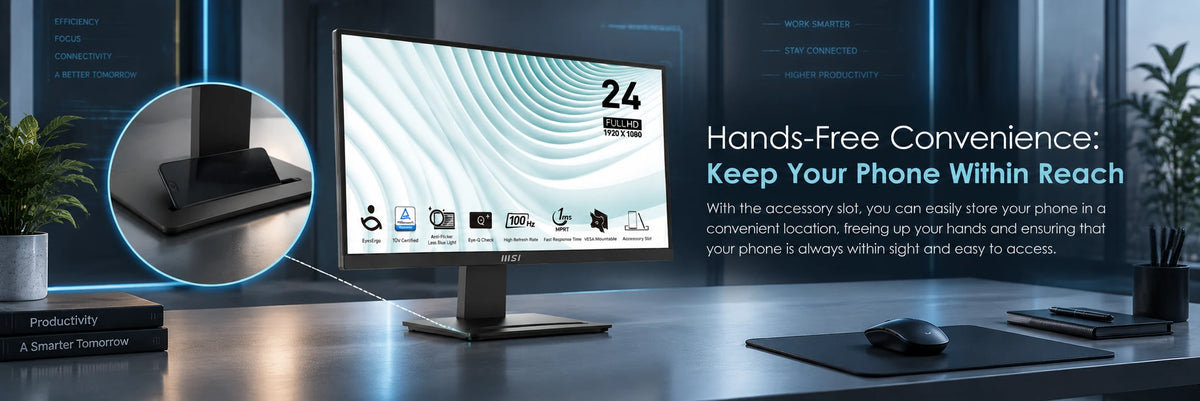
The stand assembles without tools, tilts from -5° to 20°, and has an accessory slot in the base that holds a phone upright within reach. A 75 x 75 mm VESA mount takes the MSI MT81 arm or an MSI Cubi mini PC on the back, and the MSI Display Kit app adds split-window layouts and colour modes from the desktop.
Detailed Specifications
Specifications as published by MSI in the PRO MP2412 datasheet (available below) and on the MSI product and specification pages.
Need-to-Know
- The stand tilts only, from -5° to 20°. For any other adjustment use the 75 x 75 mm VESA mount — MSI lists its own MT81 monitor arm for this series.
- No built-in audio. MSI lists no audio port and no sound output for the MP2412, so route sound through the computer or a separate device.
- Two inputs only: HDMI 1.4b and DisplayPort 1.2a. There is no VGA on this model — MSI's series overview mentions D-Sub, but the MP2412's own specification lists HDMI and DisplayPort only, which is what we quote.
- Adaptive Sync is supported over both inputs, but MSI publishes no AMD FreeSync or NVIDIA G-SYNC certification for this model.
- MSI marks the C13 power cord as optional in the accessory list, so confirm with us that your unit ships with one before you rely on it.
Best For / Customer Benefits
Customer Benefits
- 100Hz over either input makes scrolling and video calls visibly smoother than a 60Hz office screen, with no special cable needed.
- A 4000:1 contrast ratio gives dark-mode interfaces and evening video real depth, well beyond a typical office IPS panel.
- TÜV certified Anti-Flicker and Less Blue Light are built into the panel, so eye care does not depend on a software overlay that washes out colour.
- The accessory slot in the stand keeps a phone upright and visible, and the tool-free stand is on the desk in minutes.
- ENERGY STAR certification means lower running costs on a screen that is left on through a long office day.

Best For
Gallery



Official & Recommended Options
Learn More About the PRO MP2412
Frequently Asked Questions
Yes. MSI lists both inputs at 1920 x 1080 up to 100Hz — HDMI 1.4b and DisplayPort 1.2a — so either cable gives you the full refresh rate. Set 100Hz in your operating system's display settings after connecting; some systems default to 60Hz until you change it.
They measure different things. GTG (grey-to-grey) is how fast a pixel changes shade, and MSI lists 4ms. MPRT measures how long a frame is visible to your eye, and backlight strobing can cut it to 1ms. Both figures are real; MPRT is the one marketing leads with, and for office work either is more than quick enough.
Yes. The MP2412 has a standard 75 x 75 mm VESA mount. MSI lists its MT81 monitor arm for this series, and the same mount takes an MSI Cubi mini PC on the back of the screen so the computer disappears from the desk. Note the mount is 75 mm, not 100 mm — check the arm or bracket you plan to use.
One HDMI cable (2.0b), one power adaptor, one power cord (C13, marked optional) and a quick guide. There is no DisplayPort cable in the box, so order one if DisplayPort is how you plan to connect. The monitor runs from the external 12V 2.5A adaptor.
Same 23.8-inch Full HD VA panel size, but the MP241 E14V runs at 144Hz with AMD FreeSync and HDR Ready, has a 100 x 100 mm VESA mount and HDMI 2.0. The MP2412 runs at 100Hz with Adaptive Sync, has a higher 4000:1 contrast ratio, 300 cd/m² brightness against 250, a 75 x 75 mm mount and HDMI 1.4b. For office work the MP2412 is the brighter, higher-contrast choice; for gaming after hours the MP241 E14V is the faster one.
Not sure which size suits your desk?
Tell us how far you sit from the screen and what you run on it, and we will tell you honestly whether 22, 24 or 27 inches is the better buy.